Run the risk session
and leave with a P80 budget.
A guided workshop in Excel. The team names the risks, the tool builds the register live and runs a Monte Carlo simulation for cost and schedule. You walk out with a P80 budget, a P80 date and a report you can hand to the board.
See it in action.
Recorded live in Microsoft Excel, on a fictional project case.
Watch the step-by-step tutorial (23 min, YouTube)
Three questions it answers.
To align the team on risk.
What could go wrong?
A guided pre-mortem workshop turns the team's knowledge into a risk register of structured IF/THEN/IMPACT risk statements, built live on screen.
How much contingency do we need?
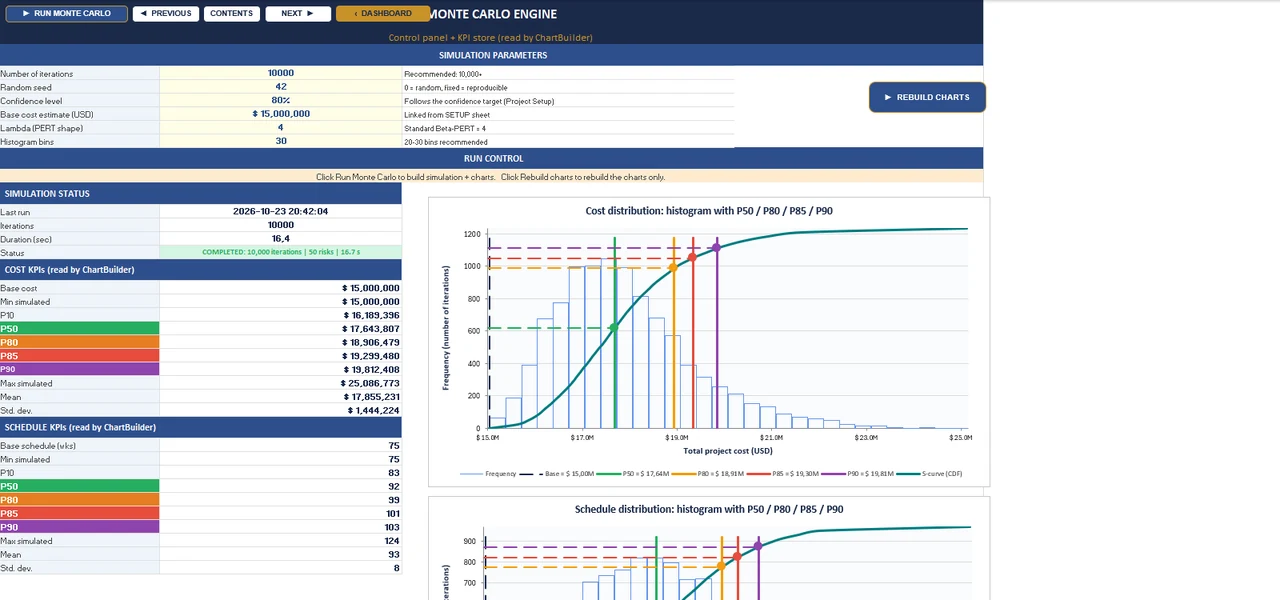
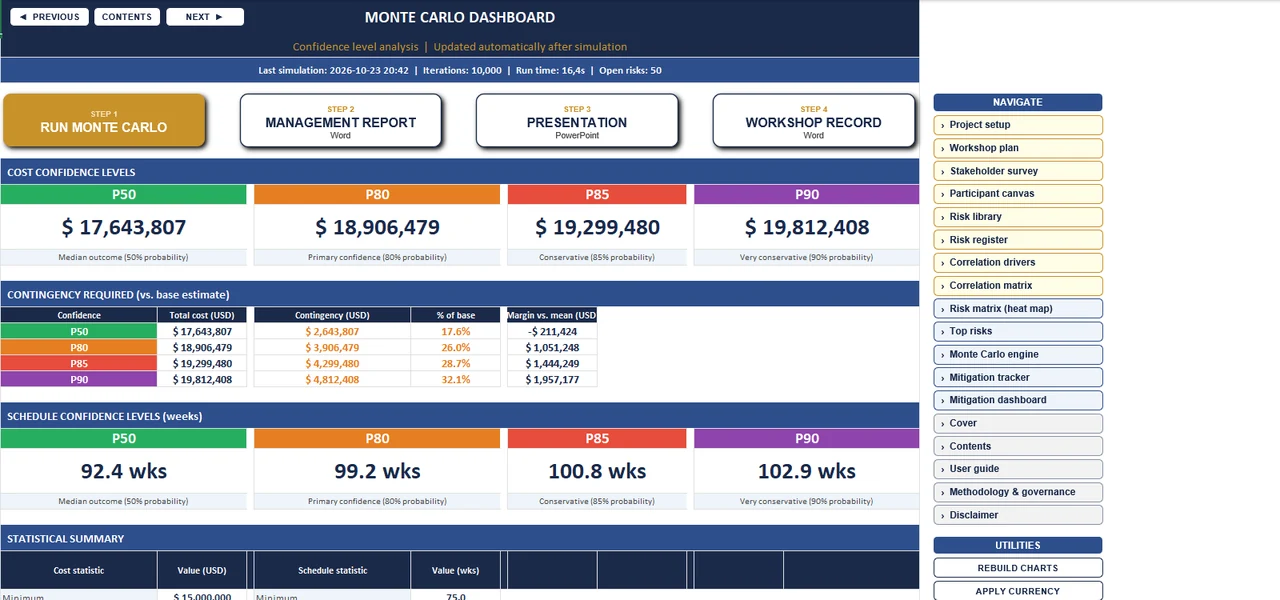
10,000 Monte Carlo iterations give the cost distribution and the P50, P80 and P90 budget.
How late could we finish?
The same simulation runs on schedule, so you get a P80 duration next to the P80 cost.
Is this the right tool?
Who it is for
Project managers, risk managers and facilitators who want the whole team to name the risks and agree on the numbers, early in a project or before a key decision.
When to choose it
Choose it when the risks are not yet on paper, or sit in a simple list, and you want one session that ends with a shared risk register and a first P80 for both cost and schedule.
Another tool fits better
- Quantitative Risk & Cost Integration Model (QRCIM) if you have a detailed cost estimate and want every cost item and risk in one model.
What’s inside.
Everything runs in Excel on your own machine.
- Facilitated workshop processAn eighteen-step tutorial for running the session, or take over an existing risk register.
- Structured IF/THEN/IMPACT risk statementsEvery risk is written as IF (cause), THEN (event) and IMPACT (consequence), the best-practice format; the + ADD RISK form composes the full description, so the whole register reads the same way.
- Correlated risksA driver model keeps related risks moving together; the Full edition also has a full correlation matrix mode.
- Top risks, two waysThe ten largest risks by expected cost and by expected delay, each with a tornado chart.
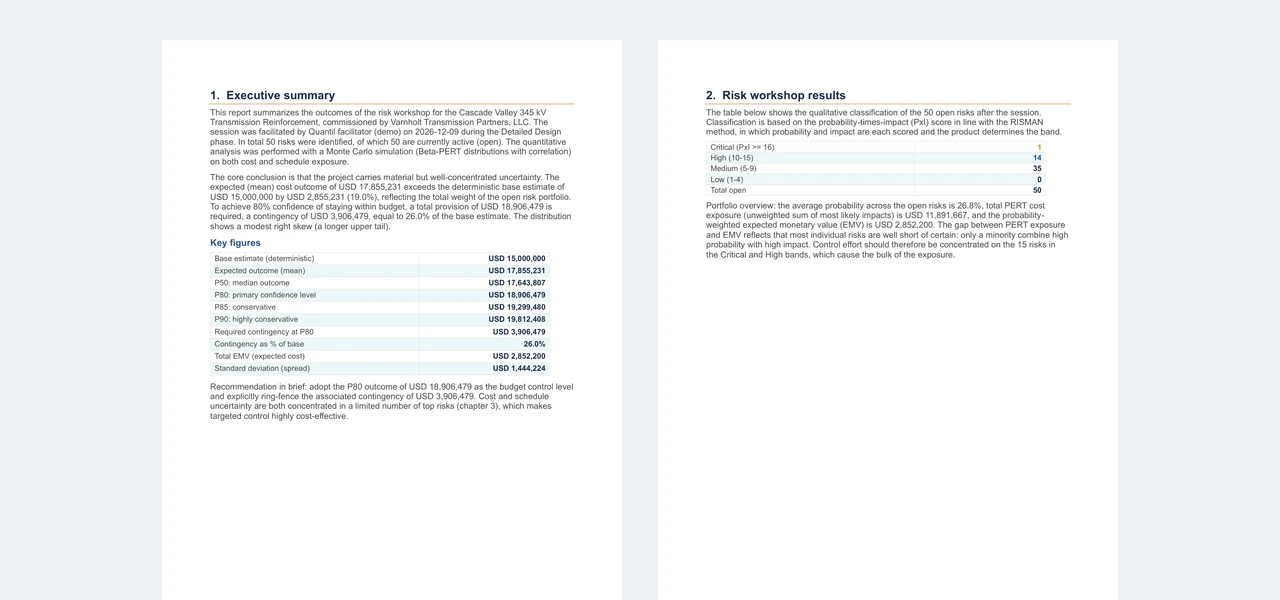
- Report, deck and workshop recordA Word management report, a PowerPoint board deck and a Word record of the workshop, generated from the results.
- Workshop Kit and risk libraryA facilitation deck, participant canvas and capture sheet, plus a library of about 150 example risks.
- Reproducible resultsThe random seed is fixed, so every run on the same data returns exactly the same numbers.
- Up to 100 risksRoom for a full project register, from the first workshop to the board report.
Numbers you can check.
Every package ships with a reference case and the exact values it should return.
Check your installation: the unchanged demo case in the Full edition (Cascade Valley 345 kV Transmission Reinforcement, fictional) returns a P80 cost of $18,906,479 and a P80 duration of 99.2 weeks at 10,000 iterations and seed 42. The free Demo runs 15 demo risks at 2,000 iterations and returns a P80 cost of $16,998,152 and a P80 duration of 97.3 weeks. How we validate ›
Editions.
One license gives you the paid editions in the package; the free Demo is for everyone.
Full
The master tool with the populated demo case.
- Workshop process and risk register
- Monte Carlo cost and schedule
- Word report and PowerPoint deck
Blank
Exactly the same tool, empty and ready for your own project.
- Empty register and project setup
- No demo case to clear out
Demo
A limited edition for colleagues who want to try it.
- 15 demo risks
- 2,000 iterations
- Free to share unchanged, for evaluation
System requirements.
| Software | Microsoft Excel 2016 or later for Windows, with macros enabled. Excel for the web, iPad and phones do not run macros. |
|---|---|
| Reports | Word and PowerPoint desktop for the report and the deck. |
| In the package | Full, Blank and Demo workbooks, Workshop Kit, user guide, ten-minute briefing, quick reference card, validation note, sample report and deck, license documents. |
| Privacy | The tool runs entirely locally. Nothing is sent or collected; no internet connection is needed after download. |
| License | Personal license: one named user on at most two devices, for your own projects and the projects you analyze for clients. See the license summary. |
Try it before you buy.
The free demo runs the same engine as the full tool, on a smaller case. Run it, look around the sheets and compare your result with the reference value on this page.
- 15 demo risks
- 2,000 iterations
- Free to share unchanged, for evaluation
Enter your name and email address; the download link arrives in your inbox right away.
Questions.
Which version of Excel do I need?
Microsoft Excel 2016 or later for Windows, with macros enabled. Excel for the web, iPad and phones do not run macros.
Does it work on a Mac?
Built and tested for Excel on Windows. The workbooks are designed to run in Excel for Mac and a macOS installation guide is included, but the tool has not yet been field-tested on a Mac.
Our IT department blocks macros. What now?
Windows often blocks macros in downloaded files. Right-click the file, choose Properties, tick Unblock, then reopen it and click Enable Content. The package includes the system requirements to share with your IT department. The tool runs entirely on your own computer and sends no data anywhere.
Can I use it for client projects?
Yes. The license covers your own projects and the projects you analyze for clients. You may share the reports and results you produce; the software itself stays with the licensed user. See the license summary.
How many computers can I install it on?
One named user on at most two devices, for example a desktop and a laptop. For a team, each user needs a license.
How do I receive the tool?
Right after payment you receive a download link by email. The package unzips to a folder with the workbooks, the user guide and the license documents.
Why do you ask for my email address for the free demo?
The download link is sent to your email address. If you tick the box to hear from us, we send a short message a few days later to ask how the demo went, with tips for a first run, and occasionally product news; you can unsubscribe in every message. We never share your address.
Are updates included?
Yes. Updates are free for 12 months from the date of purchase, and email support at support@quantiltools.com is included for the same period.
How are VAT and invoices handled?
Our sales platform, Payhip, handles the payment and VAT or sales tax, and sends you a receipt for your administration.
Can we pay by invoice or purchase order?
Yes. Email support@quantiltools.com with your company details, the tool and the number of users. We send a quote, and an invoice once you approve it. For three or more users we offer a team price.
Can I get a refund?
If the tool doesn’t run on your system, or doesn’t do what its page describes, email support@quantiltools.com within 14 days of purchase. We’ll fix it, or you get your money back. Not sure it fits your work? Try the free demo first: it runs the same engine.
Who can buy it?
Quantil tools are sold for business and professional use only, including independent consultants. They are not sold to consumers.
Does the tool decide for me?
No. It shows the consequences of your inputs, so you can decide with the numbers in front of you. The decision stays with your sponsor, project board or client.
Get the Cost & Schedule Risk Analyzer.
- Full, Blank and Demo workbooks, Workshop Kit, user guide, ten-minute briefing, quick reference card, validation note, sample report and deck, license documents.
- A personal license for one user on up to two devices. Read the license
- Free updates and email support for 12 months.
- Doesn’t the tool run on your system, or doesn’t it do what this page describes? Let us know within 14 days. We’ll fix it, or you get your money back.
Buying through your purchasing department? Ask for a quote and pay by invoice. Three or more users? Ask for a team price.
Need more than one tool? Decision Chain Bundle: all 5 tools for $2,795 instead of $3,775.
Launch offer: 20% off with code LAUNCH20 at checkout, until December 31, 2026.
Secure checkout through PayhipCard or PayPalVAT handled, receipt for your recordsInvoice on request14-day guarantee
Prices in USD, excluding VAT or sales tax. For business and professional use. Payment and tax are handled by our sales platform, Payhip.
Works well with.
Quantitative Risk & Cost Integration Model (QRCIM)
To set a budget the board signs.
Learn more →Schedule Risk Analyzer Pro
To commit to a realistic date.
Learn more →Risk Contingency Allocation Tool (RCAT)
To split the contingency fairly.
Learn more →Bid Price Optimizer
To set the bid price.
Learn more →